
OnTimeSupplies.com
FREE Shipping on all orders over $75!
P: 1-866-501-6055   C:
View Cart
$0.00
0 items
A:
Welcome. Sign In
My Account ▼

 
We Carry Thousands of Products Made in AmericaShop For Green and Recycled Products

Improve your memory with color paper and pens.

Posted by Frankye | Posted in Efficiency & Organization | Posted on 17-06-2013-05-2008

0

what-color-paper-helps-you-remember-office-ink-blog

Memory not what it used to be? Research suggests that jotting down notes in color helps you retain 50%-80% more information without reading it a second time. What color paper & pens should you use? Writer and dyslexia advocate Howie deGraaf swears by using red pens on yellow colored paper. Then there’s this from the New York Times:
Read the rest of this entry »

Video: Color Coding File Folders

Posted by Frankye | Posted in Efficiency & Organization, Helpful Hints | Posted on 15-03-2013-05-2008

0

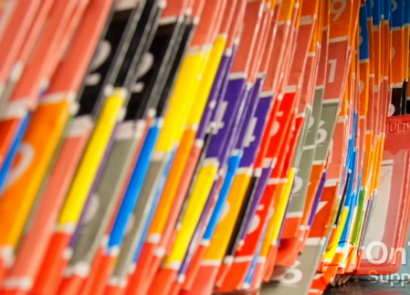
You can consider this a video followup to our post on color coding office files. We got a lot of great information from Smead for that post, and now they’ve put it all together in a quick two minute video. Basically, you want to break down your files into 4-6 categories, and then assign a color to each category.

After color coding,  you can identify filing categories at a glance. That makes it a lot easier to file and retrieve documents. Check it out the Smead Organomics video today.

Source: SmeadOrganomics

Organize Receipts with a 3 Ring Binder & Sheet Protectors

Posted by Frankye | Posted in Efficiency & Organization | Posted on 04-02-2013-05-2008

0

Order sheet protectors at On Time Supplies

Organize receipts with sheet-protectors-3-ring-binders

Ease some of the pain of tax season with a few sheet protectors, a 3 ring binder and index dividers. Take a cue from savvy home cooks and adapt the standard recipe binder into a receipt binder.  Use one sheet protector for each month, or try this tip for Coupon Fairies: fold your sheet protectors in half for twice the storage space.

The Get-It-Done Guy uses a version of this trick to track business expenses.  Here’s how it works:

1. Fill a binder with plain 3-hole punched paper and 12 monthly index dividers — one for each month.

2. Instead of shuffling receipts off into a file box (or lets be real, a shoe box), scotch tape your receipts to the paper.

3. Once you fill up a page, add up the receipts and jot down the total in the corner.

4. Use the index dividers to separate the months for easy reference.

Try these tips if you’ve been faithfully hoarding old receipts into shoe boxes. Or if you have a better method of tracking expenses, we’d love to hear them. Leave your tips in the comments.

Sources: Coupon FairiesGet-It-Done Guy


Bankers Box Mail in Rebate: last chance to get cash back with purchase.

Posted by Frankye | Posted in Efficiency & Organization, Rebates & Discounts | Posted on 07-01-2013-05-2008

0

Download Bankers Box Mail in RebateAlong with the usual vows to eat less and exercise more, my New Year’s Resolution is to be more organized in 2013.  My first target is my filing system. One of the best ways to bring some order to a system is shift old file folders into file storage boxes. Using file boxes to create an in-office archive frees up file cabinet space and protects important documents.

We offered tips on adding file storage space  with file boxes last month. This is the perfect time to tackle the project, and not just because of the industrious fever of the new year. These are the last days to take advantage of the Bankers Box mail in rebate for cash back on file box purchases. Free money — the best type of positive reinforcement! So download your rebate today and reward yourself for getting organized in 2013.

3 Tips for choosing file storage boxes for archiving documents.

Posted by Frankye | Posted in Efficiency & Organization | Posted on 17-12-2012-05-2008

0

Archiving documents with Bankers Box file storage boxes.File storage boxes are a great way to free up space in your file cabinets and archive documents you don’t need to consult every day, but can’t throw away. You need to think about 3 things when choosing your file:

  1. How much you need to store
  2. What types of items are you storing.
  3. Where you’ll keep your file boxes.

We’ve got a detailed buying guide up at OnTimeSupplies.com, but here are a few basic guidelines.

Metal Storage Boxes

Metal storage boxes are extremely durable and lockable. They are the best choice for secure storage of sensitive documents.

Plastic File Boxes

Plastic file boxes are the best choice for transporting documents. Plastic boxes are also moisture resistant, so they are great for archiving & protecting documents in less than ideal environments, such as garages.

Cardboard Boxes

Cardboard file boxes are the most common, inexpensive and versatile option for archiving files. You can get them in are range of strengths  so you can store a little or a lot. You can also choose from a range of lid closure styles depending on how often you need to get at your stored documents. You can find more information on cardboard & other file box styles here.


Best New Year’s Resolution Idea: resolve to be organized.

Posted by Frankye | Posted in Efficiency & Organization | Posted on 10-12-2012-05-2008

0

Try a New Year’s resolution you can keep this year. Resolve to be more organized in 2013. Office Ink shows you a few ways to keep that resolution.

Declutter your desk with desk files.

Can’t see your desk for all the paperwork, files and memos? Get yourself a step file and a few colored file folders and declutter your desk. 3 ring binders are another great solution for desk clutter. Armed with a stack of binders, a hole punch, some index tabs and sheet protectors, your can clear the clutter from any desk. More tips on decluttering a messy office desk here.

Free up file cabinet space with file storage boxes.

Are you devoting a lot of your file cabinet space to storing files your rarely need to reference, but can’t throw away? Free up cabinet space by shifting old files to file storage boxes. Archive old file storage boxes

Organize files with a color coding.

Group your files into major categories, then assign each group a file folder color. Color coding makes filing and retrieving documents go a lot faster. Check out our previous post for more information on setting up a color coded filing system.

Add storage with a new file cabinet or two.

Of course, sometimes you just have to break down and buy a new file cabinet. Use our guide to find the right file cabinet  size and style for your office.

Manage your time with productivity apps.

Once you’ve taken control of your files, take control of your day. There are a ton of apps out that help you better manage your time. EasyTask Manager is a great free app. Check out our guide to the best productivity apps and start accomplishing more in a day.

Best Productivity Apps for iPhone & Other Devices

Posted by Frankye | Posted in Efficiency & Organization | Posted on 03-12-2012-05-2008

1

Interested in task tracking software to help you get more done in a day? Check out our guide to the best productivity apps for iPhones and other devices.

EasyTask Manager

EasyTask Manager offers free task tracking software for smartphones, Macs and PCs, and  allows syncing with multiple devices. Use it to set up to-do lists, prioritize tasks and schedule appointments.
Cost: Free

Checklist Wrangler
Checklist Wrangler lets you create flexible checklists on iPhones & other Apple devices. The great strength of  Checklist Wrangler’s task tracking software is its flexibility. You can use it to maintain supply lists, track household chores, set reminders & more. Plus, you can schedule your checklists in various time increments, and quickly email them to anyone.
Cost: 99¢

Things
At fifty bucks, Things is pretty pricey for a productivity app, but there are several features may make it worth the money. Things  is designed to help your manage day to day tasks and long term goals. Quickly input tasks, create daily checklists, view upcoming tasks, schedule  prioritize assignments, schedule appointments & due dates and more so you can stay on top of all your responsibilities. Things’ task tracking software is very flexible. For example, the “Don’t Show In Today” allows you to push tasks into the next day’s to-do list. You can combine tasks into projects.
Cost: $49.99

ToodleDo
ToodleDo is a customizable productivity app that you can expand as needed. The basic $3 app allows you to create to-do list, schedule and priortize tasks, import data from other time management apps and sync across a variety of devices and platforms. There’s even a geo-tagging feature that alerts you when your near the site of an item on your task list.
Cost: $2.99

Do you use a productivity app not featured in this list? Tell us about it and we may feature it in an upcoming post.

Source: HowStuffWorks, Intuit Small Business Blog

When a pen & spiral notebook is more efficient computers & smartphones

Posted by Frankye | Posted in Efficiency & Organization | Posted on 14-11-2012-05-2008

0

I am not a techphobe. I work on a Lenovo laptop every day, and I adore my iPhone. Though I admit I use it more to provide a soundtrack to my sporadic workouts and to navigate the Chicago public transit system than anything else. But there are ton of business apps people use of every day to great effect. Still, as Thorin Kowalski at Lifehacker reminds us, there are some tasks best suited for plain old pen and paper. And you might have noticed that every single OnTimeSupplies.com employee profiled in our Getting to Know Series cites the pen as their favorite office supply. Here are some ways that working old school with a pen and pad beats using a smartphone or computer.

A pen and writing pad are great for brainstorming.

Can you draw a word tree on a smartphone to link ideas? No, you can not. And try to construct a similar document on a computer, and you’ll spend way too much time trying to format the text. You can’t beat a simple notebook for jotting down ideas and thinking through a project.

Writing longhand slows you down and minimizes your opportunities for goofing off.

Long hand forces you to slow down and think about what you’re saying. In the end, you don’t have to do as much revising and editing as you do when typing. Plus, if you’re stumped or hit a wall, it’s not as easy to distract yourself with cat videos on Youtube. So even though a writing  on writing pad with a pen is slower than typing on a computer, it’s more efficient.

Written to-do lists are hard to ignore and easy to remember.

You remember things better when you write them out by hand. Not to mention, it’s faster & less frustrating that pecking away at a tiny iPhone keyboard. Plus, your phone’s calendar and notes apps are easy to ignore, while a brightly colored Post-it Note is not. Kowalski writes his to-do list on a dry erase board. Personally, I prefer my big, erasable AT-A-Glance calendar. But the concept is the same: a big, visual reminder of all your tasks that’s hard ignore.

Lifehacker leaves it there, but there are other tasks I think are better suited to pen and paper than tech. Address books come to mind. It took me a month to remember my own telephone number when I switched my cell phone provider. And I haven’t memorized anyone else’s number in about 10 years. What about you? When do you choose pen and paper over tech? Let us know in the comments.

Source

Color Code File Folders for Faster Filing & Fewer Misfiles

Posted by Frankye | Posted in Efficiency & Organization | Posted on 31-10-2012-05-2008

0

If you’ve  ever  tried to track down a misfiled document — and who hasn’t — you know the task can be an exercise in frustration, and sometimes outright futility. Indexing your files to a color code solves the problem. Mislaid files stick out like a sore thumb in a color coded filing system. Plus, since we recognize color fast than text, filing and retrieving documents goes faster as well. Here are three ways you can use colored file folders and labels to eliminate misfiles and create a more efficient file storage system.

Use colored file folders to create file categories.

Manage large amounts of data? Divide your info into major categories, then assign each group a file folder color. For example, use red files for customer data, green for financials, blue for vendor, and yellow for forms. Filing and retrieving documents goes a lot faster when you can identify the contents of a folder with a glance.

Use colored file folder labels to eliminate misfiles.

Using colored file folder labels creates visual bands of color, so its easy to spot misfiles, and quickly find specific folders. Assign each component of your filing system a label color. So if you file alphabetically each letter gets its own color, numerically each number, and so on.

Sort desk files into colored file folders.

You recognize colors much faster than you read text. Replace labels such as To Do, Pending and Follow up with colored folders. Or try assigning each project it’s own colored file. Before long, you’ll ID the contents of each folder by color instead of by name, and save time.

source

Teacher Classroom Organization Tips

Posted by Frankye | Posted in Efficiency & Organization | Posted on 04-09-2012-05-2008

0

The school year is in full swing — your students are turning in assigments, permission slips are coming in, paper work is going out. If you’re already drowning in clutter, we can help. It’s easier to stay organized when you have a place for everything. Check out these classroom organization tips from real teachers and learn how to keep your classroom clutter-free.

Classroom organization tip #1: repurpose household items.

Store yarn in empty hand cleaning wipe containers. Easy to measure, easy to cut & tangle free. source: growingpk.com via 
Recycle milk jugs into pencil boxes. source: innerfunchild.com via 


Store bulletin board letters in CD Binders.source: growingpk.com via

Classroom organization tip #2: label everything!

Organize paperwork with labeled binder clips. source: hbgirl71
No forgetting that these pencils belong to Teacher! source: AlwaysLearning
Sort & store daily lessons into labeled storage bins. source: Mrs. Terhune’s First Grade Site! 

Classroom Organization Tip #3: organize your files.

Use a file tote to neatly transport files and ungraded assignments. source: E, Myself, and I

Create a “master book” for worksheets & assignments with 3 ring binders & hole-punched pocket folders source: American College of Education via: AlwaysLearning
Collect permission slips & other forms from home in interoffice envelopes.source: Tips for Teachers
Organize paper work with labels, color coding, step file source: Stacie Wilkie via

Do you have any classroom organization tips for your fellow teachers? Let’s hear ‘em! Leave your advice in the comments.

Related Posts Plugin for WordPress, Blogger...
Join Our Mailing List!
Connect With Us Social Media Facebook Google+ Twitter Blog Linked In
Badges Inc 500 BBB Digicert GSA Upfront Paypal and Credit Cards Google Wallet
OnTimeSupplies.com is Upfront
Copyright © 2004-2013 OnTimeSupplies.com, an Office Supplies company. P.O. Box 888016, Atlanta, GA 30356.